
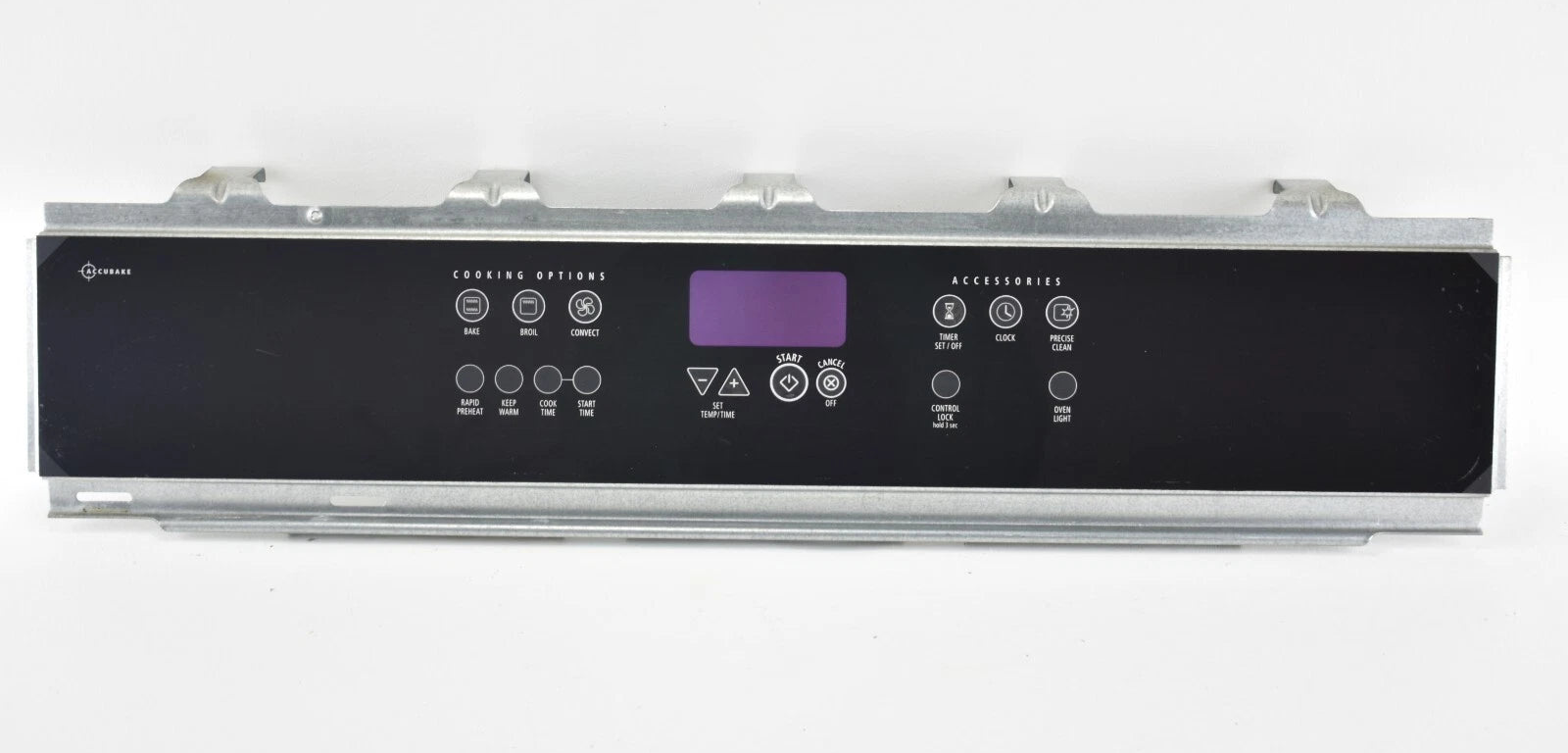
W10224753 Range 28" Touch Panel

GE Range 28" Touch Panel W10224753 — Fix Unresponsive Controls or Blank Display

Price
$250.77
Buying Options: OEM

Product variant with selected options does not exist!

Frequently Bought Together

Buying Options: OEM

Stock Notification

Get notified when this product is available again

No Longer Available — Limited Stock Remaining
NLA — LIMITED STOCK — FINAL SALE

GE Range 28” Touch Panel W10224753

Part# W10224753 Fits GFG461 Series Fits GFG464 Series Fits GFG474 Series No Longer Available

GE Gas Range Touch Controls Unresponsive or Display Blank? Touch Panel W10224753 – Fix Control Interface Failure

If your GE gas range’s touch panel is unresponsive, shows a blank display, or only partially registers input, the touch panel assembly is the direct cause — and W10224753 is the OEM replacement for GFG461, GFG464, and GFG474 series ranges. In most GE gas ranges, this is caused by a failed touch panel membrane or display board. When it fails — from heat stress, moisture, or electrical surge — the range loses its ability to accept burner or oven input, display temperatures, or initiate cooking functions. ⚡ Common failure point in GE GFG-series gas ranges, particularly after power surges or extended high-heat use. Part W10224753 is the genuine OEM 28” touch panel that restores full control interface function immediately.

⚠️ NLA — No Longer Available from GE: This part has been discontinued by the manufacturer. When current stock sells out, no further supply will be available. This is a Final Sale — No Returns or Exchanges. Verify your model number before ordering. Contact us to confirm fit before purchasing.

❓ Is This the Right Part?

This is the correct fix if ALL of the following are true:

  • ✔ Range powers on — igniter, burners, and oven function when manually activated
  • ✔ Touch panel buttons are unresponsive or only partially responsive
  • ✔ Display is blank, flickering, or showing partial segments
  • ✔ Your model number is one of the GFG461, GFG464, or GFG474 series listed below
  • ✔ ONLY problem is touch interface failure — not a gas supply, igniter, or oven sensor issue

Not sure? Send us your model number — we’ll confirm before you order.

🔧 Common Symptoms

  • Touch panel completely unresponsive — no buttons register input
  • Display blank or dark — no temperature, timer, or status shown
  • Partial button response — some functions work, others don’t
  • Display flickering or showing garbled characters
  • Range won’t enter bake or broil mode despite burners working normally
  • Timer and clock functions lost after power interruption

✔ If these symptoms match, the touch panel is the most likely failed component in the system.

✔ In most cases, replacing this touch panel restores full range control immediately.

📦 Part Details

  • Part Number: W10224753
  • Type: 28” Range Touch Panel Assembly — user interface membrane and display board; mounts to the front control panel of GFG-series GE gas ranges
  • Replaces: Verify via model number — no additional cross-references on file
  • Brands: GE (General Electric)
  • Status: NLA — Discontinued. Final stock only. No Returns or Exchanges.
⚠️ Recommended While Repairing:
If the touch panel failed after a power surge, also inspect the Range Control Board (ERC) — a surge that damages the touch panel often damages the electronic range control on the same circuit. Replacing the panel without checking the ERC can result in the new panel failing again or the range still not operating correctly after installation.

⚙️ Installation

Skill Level: MODERATE — 20–30 minutes. Disconnect power before servicing. Remove the screws securing the control panel to the range backguard — typically located at the rear or under decorative end caps. Photograph all wiring harness connections before disconnecting. Disconnect the ribbon cable and harness connectors from the back of the old panel, transfer any mounting hardware, and connect the new W10224753 panel in the same positions. Secure the panel, restore power, and test all touch functions and display before completing the repair.

✓ Compatible Models

Confirmed compatible with GFG461LVB0, GFG461LVB1, GFG461LVB2, GFG461LVB3, GFG461LVQ0, GFG461LVQ1, GFG461LVQ2, GFG461LVQ3, GFG461LVS0, GFG461LVS1, GFG461LVS2, GFG461LVS3, GFG461LVT0, GFG461LVT1, GFG461LVT2, GFG461LVT3, GFG464LVB0, GFG464LVB1, GFG464LVB2, GFG464LVQ0, GFG464LVQ1, GFG464LVS0, GFG464LVS1, GFG464LVS2, GFG474LVS0, GFG474LVS1. Contact us to verify your model number before ordering — this is a Final Sale item.

💡 Pro Tip

NLA Parts — Order Now or Lose the Option:
W10224753 is discontinued by GE and will not be restocked once current inventory is depleted. If you have a second GFG461, GFG464, or GFG474 range — or know someone who does — this is the time to secure a spare. Aftermarket alternatives for this panel are not available, and once OEM stock is gone, the only remaining option is a used panel or full range replacement. This is also a Final Sale item — verify your model number against the compatibility list above before ordering.

✅Compatibility & Cross Reference

GFG461LVB0, GFG461LVB1, GFG461LVB2, GFG461LVB3, GFG461LVQ0, GFG461LVQ1, GFG461LVQ2, GFG461LVQ3, GFG461LVS0, GFG461LVS1, GFG461LVS2, GFG461LVS3, GFG461LVT0, GFG461LVT1, GFG461LVT2, GFG461LVT3, GFG464LVB0, GFG464LVB1, GFG464LVB2, GFG464LVQ0, GFG464LVQ1, GFG464LVS0, GFG464LVS1, GFG464LVS2, GFG474LVS0, GFG474LVS1

Not sure about your model number? Call 1-877-899-7278 and we’ll help you confirm. All brand names are the property of their respective owners and are used for compatibility reference only.

Buy Online Pick Up In-Store

Address
101 Trillium Dr
Kitchener, Ontario N2E 1W8
Hours
Mon–Fri 9 AM–5 PM • Sat 9 AM–1 PM
Get Directions
