


MICROWAVE KEYPAD DOES NOT RESPOND CORRECTLY
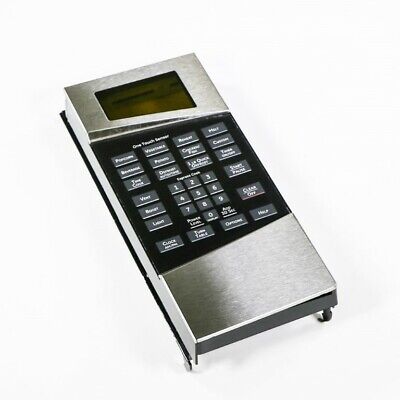
GE Microwave Control Panel Assembly, Stainless Steel WG02F05309, Fixes Microwave keypad does not respond correctly
Stainless-steel microwave control-panel assembly. Retailer parts diagrams identify WG02F05309 as “Control Panel Asm Ss” / “PANNEAU DE COMMANDE ASM AI.”
Part WG02F05309GE
Guaranteed to Fit — or your money back.
Confirm your full appliance model number before ordering.
Confirm your full appliance model number before ordering.
Is This the Right Part?
Part NumberWG02F05309
ManufacturerGE
Appliance TypeMicrowave
Part TypeControl Panel Assembly, Stainless Steel
✅ Cross Reference Information
Current Part NumberWG02F05309
Common Symptoms
- Some or all touch-panel keys do not respond.
- Display is dim, fading, or shows missing segments.
- Control panel is intermittently unresponsive after power is confirmed.
- Microwave appears powered but cannot accept normal control inputs.
Check Before Replacing
- Confirm the microwave is connected to a grounded outlet and that the household breaker or fuse has not tripped.
- Check whether the display or control panel has been intentionally turned off through a Display On/Off or Power Saver setting, if provided on the model.
- Cancel any incomplete programming sequence and try the controls again.
- Disconnect microwave power for approximately 30 seconds, restore power, and retest the panel.
- If the display remains blank or the keypad remains unresponsive, have the appliance professionally serviced; these checks do not establish that the control-panel assembly is defective.
Pro Tip
A nonresponsive panel is not proof that the panel assembly has failed; first rule out loss of power, control-panel lock or settings, and an incomplete programming sequence.
Part Details
Part NumberWG02F05309
Part TypeControl Panel Assembly, Stainless Steel
ManufacturerGE
Appliance TypeMicrowave
Primary FunctionProvides the microwave’s user-facing stainless-steel control-panel interface, including the keypad and display interface used to enter and monitor cooking functions.
Installation Notes
- Disconnect electrical power before any service work.
- Verify the replacement part’s model and finish match the appliance before installation.
- Do not disassemble or service the microwave’s high-voltage sections unless qualified to do so.
- Transfer or reconnect wiring only according to the appliance’s applicable service documentation; do not force connectors or alter the harness.
- After installation, restore power and verify the display and keypad functions without bypassing any safety devices.
Verified Compatible Models
PVM1870SMC01, PVM1870SMC02
Fitment reminder: Match the complete appliance model number, including suffix or revision where applicable, before ordering.
Buy Online Pick Up In-Store
Address
101 Trillium Dr
Kitchener, Ontario N2E 1W8
Kitchener, Ontario N2E 1W8
Phone
Hours
Mon–Fri 9 AM–5 PM • Sat 9 AM–1 PM


