


A DAMAGED OR MISSING LENS CAN MAKE AN OTHERWISE FUNCTIONING INDICATOR LIGHT DIFFICULT TO SEE
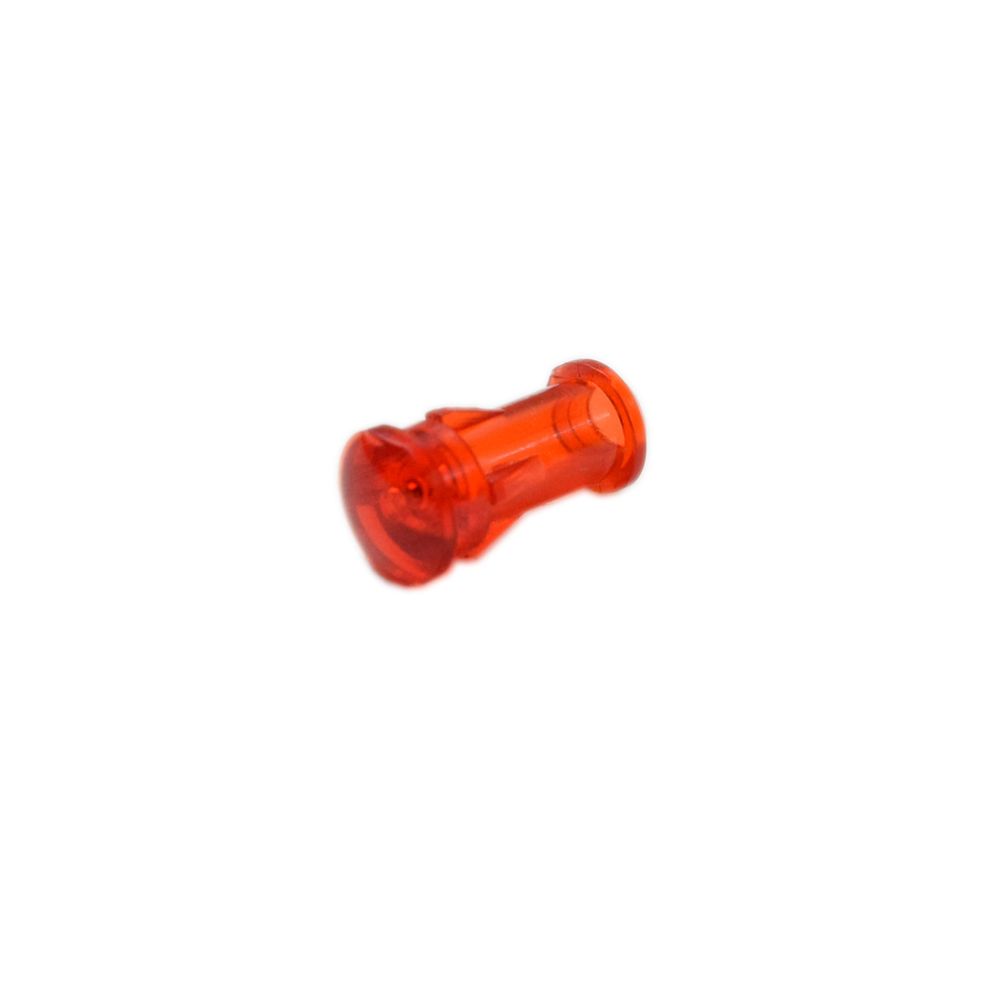
Whirlpool Corporation Washer Lens, Indicator Light WP22001948, Fixes A damaged or missing lens can make an otherwise functioning indicator light difficult to see
Genuine Whirlpool OEM indicator-light lens used in residential Maytag, Whirlpool, and Jenn-Air laundry appliances and ranges.
Part WP22001948Replaces 22001948, 74005769, 7730P031-60Whirlpool Corporation
Guaranteed to Fit — or your money back.
Confirm your full appliance model number before ordering.
Confirm your full appliance model number before ordering.
Is This the Right Part?
Part NumberWP22001948
Replaces22001948, 74005769, 7730P031-60
ManufacturerWhirlpool Corporation
Appliance TypeWasher
Part TypeLens, Indicator Light
✅ Cross Reference Information
Current Part NumberWP22001948
Replaces22001948, 74005769, 7730P031-60
Common Symptoms
- Cracked, broken, cloudy, yellowed, or missing indicator-light lens
- Indicator light appears dim or unclear because the lens is damaged or obscured
- Loose lens or visible gap around the indicator opening
Check Before Replacing
- With the appliance unplugged, visually inspect the lens for cracks, clouding, discoloration, looseness, or missing pieces.
- During normal appliance operation, observe whether the indicator illuminates through the lens without opening the appliance or touching internal wiring.
- If the indicator does not illuminate, compare the condition of the lens with the appliance’s other indicators; a lens replacement will not correct a failed lamp, LED, switch, or control circuit.
Pro Tip
Confirm the appliance model and compare the replacement lens’s shape and mounting features with the original before ordering; the lens is only the optical cover and does not include the indicator lamp or electrical components.
Part Details
Part NumberWP22001948
Part TypeLens, Indicator Light
ManufacturerWhirlpool Corporation
Appliance TypeWasher
Primary FunctionCovers and transmits light from an appliance indicator lamp or LED so the operating-status indicator is visible through the control panel.
Installation Notes
- Disconnect electrical power before accessing or replacing the lens.
- Wear protective gloves when handling a cracked or broken lens or when working near sheet-metal control-panel edges.
- Use the model-specific parts diagram or service documentation for the appliance because access and retention method vary by washer, dryer, and range.
- Do not force the lens into place; verify that the replacement is correctly aligned with the indicator opening and retained by the appliance’s existing panel structure.
Verified Compatible Models
JES8850BCS, LAT8816AAE, LAT8816AAM, LAT8826AAE, LAT8826AAM, LAT9616AAE, LAT9616AAM, LAT9706AAE, LAT9706AAM, LAT9706AAQ, LAT9706ABE, LAT9757AAE, MAH3000AWW, MAH5500AWW, MDG4000BWW
Fitment reminder: Match the complete appliance model number, including suffix or revision where applicable, before ordering.
Buy Online Pick Up In-Store
Address
101 Trillium Dr
Kitchener, Ontario N2E 1W8
Kitchener, Ontario N2E 1W8
Phone
Hours
Mon–Fri 9 AM–5 PM • Sat 9 AM–1 PM