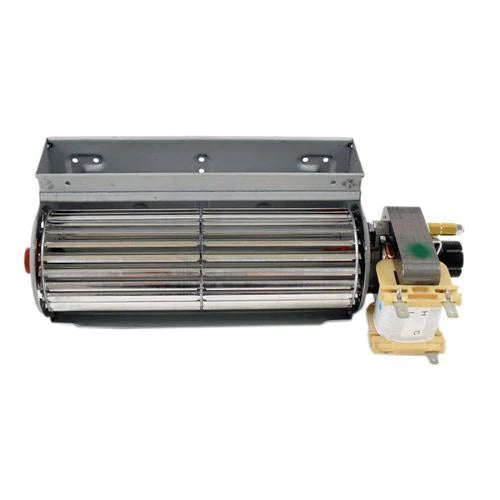
XPart Supply WS01F09894 oven fan motor for sale replacement blower assembly with metal squirrel cage and mounting bracket
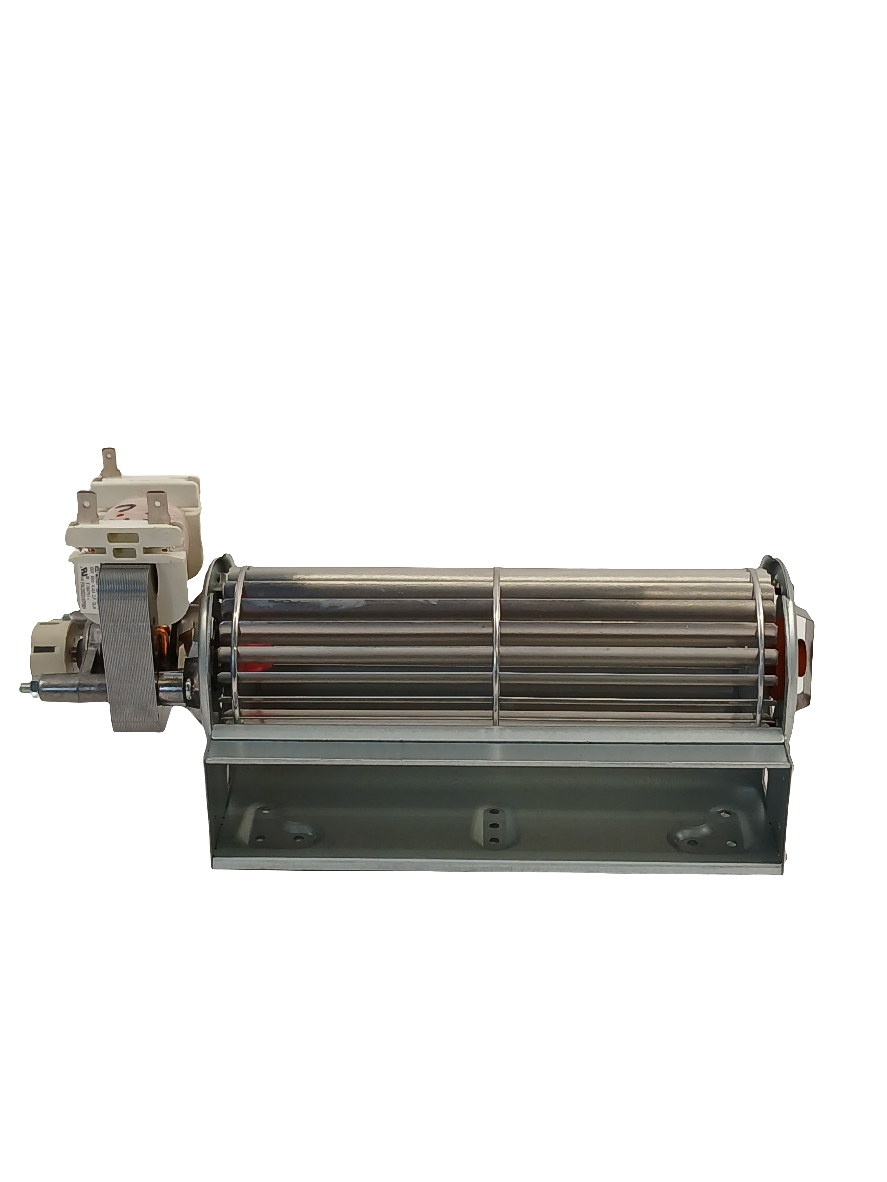
XPart Supply WS01F09894 oven fan motor for sale tangential blower assembly metal housing
XPart Supply WS01F09894 oven fan motor for sale tangential blower assembly with mounting bracket
XPart Supply WS01F09894 oven fan motor for sale replacement blower wheel motor assembly for oven
XPart Supply WS01F09894 oven fan motor for sale replacement oven blower assembly with squirrel cage wheel
WS01F09894 oven fan motor for sale replacement assembly with metal housing mounting brackets and electrical connector XPart Supply
WS01F09894 Range Oven Cooling Fan Motor (replaces WS01F08520, WS01F09530)

WS01F09894 Range Oven Cooling Fan Motor (replaces WS01F08520, WS01F09530)

Sale price
$100.26
Regular price
$119.31
You save
$19.05 (16%)

XPart Number: 9768706277665   |   GTIN: 3513804172332

Buying Options: OEM
Condition: New

Product variant with selected options does not exist!

Frequently Bought Together

Guaranteed to fit your model: Need help? Call 833-899-7278

Shipper / Seller: XPart Supply Ltd.

Professional Repair Time: 45-60 minutes
DIY Repair Time: 60-90 minutes
Difficulty Rating: Medium (3/5) — Requires unplugging range, removing rear or top panel, locating and testing motor, disconnecting wires, removing old motor, installing new motor, reconnecting wires, reinstalling panel, verifying proper cooling

  • No cooling fan operation when oven is on (motor failure, most common symptom)
  • Loud grinding or squealing noise from fan area (worn motor bearings)
  • Control panel overheating or too hot to touch (inadequate cooling)
  • Electronic control board failure (overheating damage)
  • Oven shutting down unexpectedly (thermal protection activated)
  • Error codes displayed (control board detecting cooling system failure)
  • Burning smell from motor area (motor overheating)
  • Visible damage to motor or fan blade (physical damage)
  • Weak airflow from exhaust vents (motor running slowly or fan blade damaged)
  • Fan running but no airflow (fan blade broken or detached)
  • Intermittent fan operation (loose electrical connections or failing motor)
  • Fan continues running after oven is off for extended period (control board or sensor failure)

Item #565 in diagram.


Part number WS01F09894 replaces WS01F08520, WS01F09530, WB26X32571, 295D1475P001, 295D3187P001

GE, Hotpoint, Kenmore (GE-made)

Fits Models: (Ctrl+F and Enter Your Model Number)


C2S900P2M1S1, C2S950P4M1W2, CC2S900M2N1S5, CC2S900P2M2S1, CC2S900P3M2D1, CC2S900P4M2W2, CC2S950M2N1S5, CC2S950P2M2S1, CC2S950P3M1D1, CC2S950P4M1W2, CCES700P2M2S1, CCES700P2M3S1, CCES700P3M2D1, CCES700P4M2W2, CCES700P4M3W2, CCES750P2M1S1, CCES750P4M3W2, CCES750P4M4W2, CCGS700M2N1S5, CCGS700P2M3S1,CCGS700P3M2D1, CCGS700P3M3D1, CCGS700P4M2W2, CCGS700P4M3W2, CCGS750M2N1S5, CCGS750P2M3S1, CCGS750P4M2W2, CCGS750P4M3W2, CCHS900P2M3S1, CCHS900P2M4S1, CCHS900P2M5S1, CCHS900P2M6S1, CCHS900P3M2D1, CCHS900P4M2W2, CCHS900P4M3W2, CCHS900P4M4W2, CCHS900P4M5W2, CCHS950P2M3S1, CCHS950P2M4S1, CCHS950P2M5S1, CCHS950P2M6S1, CCHS950P3M2D1, CCHS950P3M3D1, CCHS950P3M4D1, CCHS950P3M5D1, CCHS950P4M2W2, CCHS950P4M3W2, CCHS950P4M4W2, CCHS950P4M5W2, CES700P2M1S1, CES700P3M2D1, CES700P4M1W2, CGS700P2M2S1, CGS700P3M3D1, CGS700P4M2W2, HGP8050K1A, HGP8050YE1A, IO940TS0A, IO950FS0A, IO950TS0A, JCGS760EP2ES, JCGS760EP3ES, JCGS760EP4ES, JCGS760SP2SS, JCGS760SP3SS, JCGS760SP4SS, JCS830SM5SS, JCS830SV1SS, JCS840EM5ES, JCS840SM5SS, JCSS630SM5SS, P2S930YP1FS, PC2S930YP1FS, PC2S930YP2FS, PCGS930YP2FS, PCGS960EEL3ES, PCGS960EEL4ES, PCGS960YP1FS, PCGS960YP2FS, PCHS920BM2TS, PCHS920SM2SS, PCHS920YM1FS, PCHS920YM2FS, PCHS920YM3FS, PCS915SM4SS, PCS940BM4TS, PCS940BM5TS, PCS940DM4WW, PCS940DM5WW, PCS940DM6WW, PCS940DM7WW, PCS940EM4ES, PCS940EM5ES, PCS940EM6ES, PCS940EM7ES, PCS940FM3DS, PCS940SM4SS, PCS940SM5SS, PCS940YM1FS, PCS940YM2FS, PCS940YM3FS, PCS980SM5SS, PCS980YM1FS, PCS980YM2FS, PCS980YM3FS, PCS980YM4FS, PGS950FS0A, P2S930YP1FS, PC2S930YP1FS, PC2S930YP2FS, PCGS930YP2FS, PCGS960EEL3ES, PCGS960EEL4ES, PCGS960YP1FS, PCGS960YP2FS, PCHS920BM2TS, PCHS920SM2SS, PCHS920YM1FS, PCHS920YM2FS, PCHS920YM3FS, PCS915SM4SS, PCS940BM4TS, PCS940BM5TS, PCS940DM4WW, PCS940DM5WW, PCS940DM6WW, PCS940DM7WW, PCS940EM4ES, PCS940EM5ES, PCS940EM6ES, PCS940EM7ES, PCS940FM3DS, PCS940SM4SS, PCS940SM5SS, PCS940YM1FS, PCS940YM2FS, PCS940YM3FS, PCS980SM5SS, PCS980YM1FS, PCS980YM2FS, PCS980YM3FS

CRITICAL SAFETY WARNING: This repair involves working with electrical components and accessing the rear or top of the range. Always unplug the range from the electrical outlet or turn off the circuit breaker before beginning work to prevent electrical shock. If uncomfortable with this repair or unfamiliar with range disassembly procedures, hire a qualified appliance technician. IMPORTANT: The cooling fan motor is located in different positions depending on the range model—consult your owner's manual or take photos during disassembly to identify the exact location.TOOLS REQUIRED: Phillips screwdriver, flathead screwdriver, nut driver or socket set (typically 1/4-inch or 5/16-inch), needle-nose pliers, flashlight, work gloves, multimeter (for testing).IMPORTANT: Before replacing the cooling fan motor, verify the motor is actually faulty by testing for power and checking for obstructions.

  1. Unplug the range from the electrical outlet or turn off the circuit breaker to ensure complete power disconnection. CRITICAL: Never work on the range while it's plugged in or powered.
  2. Pull the range away from the wall to access the rear panel. Caution: The range may be heavy—get assistance if needed.
  3. Take multiple photos of the cooling fan motor location, wire connections, mounting position, and fan blade orientation before disassembly. CRITICAL: Proper reassembly requires exact wire positioning and fan orientation.
  4. Take detailed close-up photos of: the motor wire connections and wire colors, the motor mounting bracket and mounting screws, the fan blade orientation (which direction it faces), and any other components nearby.
  5. Determine the access method for your range model. Most ranges require either: (A) removing the rear panel, or (B) removing the top panel and accessing from above. Consult your owner's manual if unsure.
  6. For rear panel access (most common method):Remove the screws securing the rear panel (typically 6-10 screws around the perimeter)Carefully remove the rear panel and set it asideLocate the cooling fan motor at the top or middle of the oven cavity
  7. For top panel access (alternate method):Remove the screws securing the top panel (typically 2-4 screws at the back)Lift the top panel up and prop it open safelyLocate the cooling fan motor behind the control panel
  8. Locate the cooling fan motor assembly. The motor is typically mounted with 2-4 screws and has a long cylindrical fan blade attached.
  9. Inspect the old cooling fan motor for damage indicators: no motor operation when power is applied (motor failure, most common), loud grinding or squealing noise (worn motor bearings), visible damage to motor housing or fan blade (physical damage), or burned or melted wires (electrical failure). This confirms the diagnosis.
  10. Test the old cooling fan motor with a multimeter by measuring voltage at the motor connector when the oven is on. The motor should receive 120V AC. If voltage is present but the motor doesn't run, the motor is faulty. If no voltage is present, the control board or wiring may be faulty.
  11. Disconnect the motor wire connector from the range wiring harness by pulling the connector straight apart. Caution: Do not pull on the wires—grasp the connector and pull straight.
  12. Remove the mounting screws securing the cooling fan motor to the mounting bracket or oven cavity using a Phillips screwdriver or nut driver (typically 2-4 screws). Caution: Support the motor while removing the last screw.
  13. Carefully remove the cooling fan motor assembly from the range, maneuvering the long fan blade through the mounting area. Important: Note the fan blade orientation—it must be installed the same way.
  14. Inspect the motor mounting area for damage, debris, or blocked air passages. Clean thoroughly if needed.
  15. Inspect the air intake and exhaust vents for blockages. Clear any debris that could restrict airflow.
  16. Unpack the new WS01F09894 cooling fan motor from its packaging. CAUTION: The motor and fan blade are precision components—handle carefully to avoid damaging the fan blade.
  17. Compare the new cooling fan motor to the old one to verify overall dimensions, fan blade length and design, mounting bracket configuration, wire connector type, and overall design match.
  18. Inspect the new cooling fan motor for any shipping damage before installation. The motor housing should be intact with no dents or damage, the fan blade should be straight and undamaged, the mounting bracket should be intact, and the wire connector should be clean and undamaged.
  19. Test the new cooling fan motor before installation by temporarily connecting it to the range wiring harness and turning on the oven. The motor should run smoothly with no unusual noises. CRITICAL: If the motor doesn't run or makes unusual noises, it's defective—do not install it.
  20. Disconnect the test connection and prepare for installation.
  21. Position the new cooling fan motor in the mounting location, carefully maneuvering the long fan blade through the mounting area. Important: Ensure the fan blade is oriented correctly per your detailed photos—the fan must blow air in the correct direction.
  22. Align the mounting holes on the motor bracket with the mounting holes in the oven cavity or mounting bracket.
  23. Install the mounting screws to secure the motor. Start all screws by hand before tightening. Important: Do not over-tighten—this can crack the motor housing.
  24. Tighten the mounting screws firmly using a Phillips screwdriver or nut driver. Caution: Tighten evenly to prevent motor misalignment.
  25. Verify the motor is securely mounted with no excessive play or movement. Try to move the motor by hand—it should not move at the mounting points.
  26. Connect the motor wire connector to the range wiring harness by pushing the connectors together until they click into place. CRITICAL: Incorrect connections cause motor malfunction or safety hazards.
  27. Verify the wire connector is fully seated by trying to pull it apart—it should not come apart without pressing the release tab.
  28. Verify the fan blade can rotate freely without contacting any surrounding components. Manually rotate the fan blade—it should spin freely with no resistance or scraping.
  29. Reinstall the rear panel or close the top panel by reversing the removal steps. Align the panel with the mounting holes and install the mounting screws.
  30. Tighten the panel screws firmly using a Phillips screwdriver or nut driver. Caution: Do not over-tighten—this can crack the panel.
  31. Push the range back into position against the wall.
  32. Restore electrical power by plugging in the range or turning on the circuit breaker.
  33. Run a test cycle to verify proper cooling fan motor operation:Turn on the oven to any temperatureListen for the cooling fan motor to startVerify the motor runs smoothly with no unusual noisesFeel the exhaust vents for airflowAllow the oven to heat for 10-15 minutesTurn off the ovenVerify the cooling fan continues to run for several minutes after the oven is off
  34. Check for proper cooling fan operation during the test cycle. The fan should run smoothly and quietly.
  35. Verify airflow from the exhaust vents. You should feel air blowing from the vents when the fan is running.
  36. Monitor for any unusual sounds during the test cycle. There should be no grinding, squealing, or rattling noises.
  37. Verify the control panel doesn't overheat during extended oven operation. The control panel should remain cool enough to touch.
  38. If the cooling fan operates smoothly and quietly with proper airflow, the repair is complete.

Safety Notes: Always unplug the range or turn off the circuit breaker before working on the cooling fan motor. Verify all wire connections are secure and properly installed before testing. Test the new motor before installation to verify it's functioning. Ensure the fan blade can rotate freely without obstruction. Verify proper airflow from exhaust vents after installation. Test operation through a complete heating cycle to verify proper cooling. This repair typically takes 45-90 minutes depending on range model and access method. If uncomfortable working with range electrical systems or unfamiliar with cooling fan motor replacement procedures, hire a professional appliance technician.

  1. The WS01F09894 cooling fan motor is designed to run continuously during oven operation and for a period after the oven is turned off—if the fan doesn't run or stops prematurely, the oven can overheat and damage expensive electronic controls. The cooling fan motor is controlled by the electronic control board, which automatically starts the fan when the oven reaches a certain temperature and keeps it running after the oven is turned off until the internal temperature drops to a safe level. If the fan doesn't start when the oven is on, the motor is likely faulty. If the fan stops too quickly after the oven is turned off, the control board or thermal sensor may be faulty. Always verify the motor receives power and runs smoothly before assuming the control board is faulty. A faulty cooling fan motor that fails to run will cause the control panel and electronic components to overheat, potentially causing permanent damage to expensive control boards and requiring costly repairs beyond just the motor replacement.
  2. The tangential fan blade design is critical for proper cooling—the long cylindrical blade must be straight and undamaged for optimal airflow. The tangential blower design moves air efficiently through narrow cooling passages in the range. If the fan blade is bent, cracked, or damaged, airflow is reduced, cooling is inadequate, and the motor must work harder, accelerating wear. When replacing the cooling fan motor, inspect the fan blade carefully for damage. If the blade is bent or damaged, do not attempt to straighten it—replace the entire motor assembly. A damaged blade reduces cooling efficiency and can cause vibration and noise. Always ensure the new fan blade is straight and undamaged before installation.
  3. The cooling fan motor must be oriented correctly for proper airflow direction—improper orientation causes inadequate cooling and potential overheating. The tangential fan blade must blow air in the correct direction through the cooling passages. If the motor is installed backwards or rotated incorrectly, air flows in the wrong direction, cooling is ineffective, and the oven overheats. Always take detailed photos of the fan blade orientation before disassembly and ensure the new motor is installed with the blade facing the same direction. Verify the fan blade orientation by checking the direction of airflow from the exhaust vents after installation.
  4. Air passage blockages are a common cause of cooling system failure—before replacing the cooling fan motor, verify the air intake and exhaust vents are clear. If the air intake vents are blocked by dust or debris, the motor can't draw cool air, reducing cooling effectiveness. If the exhaust vents are blocked, hot air can't escape, causing the oven to overheat. Before replacing the motor, inspect both the intake and exhaust vents and clear any blockages. If the vents are clear but cooling is still inadequate, the motor is likely faulty. Regular cleaning of the air vents prevents cooling system problems and extends motor life.
  5. Motor bearing wear is the most common cause of cooling fan motor failure—worn bearings cause loud grinding or squealing noises and eventually cause motor seizure. The motor has precision ball bearings that allow the shaft to spin smoothly. Over time, the bearings wear out from age and heat exposure, causing friction and noise. As the bearings wear further, the motor becomes harder to turn, eventually seizing completely. If you hear grinding or squealing noises from the fan area, the motor bearings are worn and the motor should be replaced immediately. Continuing to operate with worn bearings accelerates motor failure and can cause the motor to seize, preventing cooling and causing overheating.
  6. The motor wire connector must be fully seated and secure—loose or corroded connections cause intermittent operation or complete motor failure. The motor connects to the range wiring harness through a wire connector. If the connector is loose, corroded, or not fully seated, electrical contact is poor, causing intermittent operation or complete failure. When replacing the motor, verify the wire connector is fully seated by trying to pull it apart—it should not come apart without pressing the release tab. If the connector is corroded, clean it thoroughly with a wire brush before connecting. If the connector is damaged, it should be replaced.
  7. The control panel temperature must be monitored during extended oven operation—if the control panel becomes too hot to touch, cooling is inadequate and the motor may be failing. The cooling fan motor is designed to keep the control panel at a safe temperature during oven operation. If the control panel becomes too hot to touch after 20-30 minutes of oven operation, cooling is inadequate. This can be caused by a faulty motor, blocked air vents, or a faulty thermal sensor. If the control panel overheats, turn off the oven immediately and investigate the cause. Continued operation with inadequate cooling can damage expensive electronic controls.
  8. The motor winding insulation can fail from prolonged overheating—if the motor overheats or smells like burning plastic, it should be replaced immediately. The motor has electrical windings insulated with heat-resistant material. If the motor overheats from prolonged operation without adequate cooling or from a faulty thermal sensor, the insulation can break down, causing short circuits and motor failure. If you smell burning plastic or electrical burning smell from the motor area, the motor insulation is failing and the motor should be replaced immediately. Continuing to operate with a failing motor can cause electrical fires or damage to the range wiring harness.
  9. The motor mounting must be secure and level—improper mounting causes vibration, noise, and accelerated bearing wear. The motor must be mounted securely with all mounting screws tightened firmly and evenly. If the motor is mounted at an angle or with loose screws, vibration occurs during operation, causing noise and accelerating bearing wear. When installing the new motor, ensure all mounting screws are tightened evenly and the motor is level. Verify the motor doesn't move when you try to move it by hand—it should be completely secure.
  10. After replacing the cooling fan motor, verify proper airflow by feeling the exhaust vents—you should feel warm air blowing from the vents when the fan is running. This simple test verifies that the motor is running, the fan blade is rotating, and airflow is adequate. If you don't feel airflow from the exhaust vents, the motor may not be running, the fan blade may be blocked, or the air passages may be blocked. Stop and investigate before continuing to use the oven. Proper airflow is critical for adequate cooling and control panel protection.
  11. The cooling fan motor lifespan is typically 8-12 years with average use, but can be shortened by prolonged overheating, dust accumulation, or manufacturing defects. Factors that shorten motor life include: prolonged overheating from blocked air vents (thermal stress), dust and lint accumulation on the motor (efficiency loss and overheating), manufacturing defects, or low-quality replacement motors (premature failure). To extend motor life and prevent premature failure, clean the air vents periodically to remove dust and debris, ensure the motor receives adequate cooling, use genuine OEM motors, and replace the motor promptly if it shows signs of failure. Regular maintenance and prompt replacement of faulty motors ensure reliable range operation and prevent expensive control board damage.
  12. The electronic control board controls cooling fan motor operation through temperature sensing—if the fan doesn't run when the oven is on, verify the motor receives power before assuming the control board is faulty. Test the motor by measuring voltage at the motor connector with a multimeter when the oven is on. If the motor receives 120V AC but doesn't run, the motor is faulty and should be replaced. If the motor doesn't receive power, the control board, wiring, or thermal sensor may be faulty. A multimeter test quickly identifies whether the problem is the motor or the control system, preventing unnecessary parts replacement and ensuring accurate diagnosis.


Whirlpool refrigerator replacement parts, Frigidaire refrigerator replacement parts, GE refrigerator replacement parts, Kenmore refrigerator replacement parts, KitchenAid refrigerator replacement parts, LG refrigerator replacement parts, Maytag refrigerator replacement parts, Whirlpool refrigerator drawers and glides replacement, Whirlpool dishwasher replacement parts, GE dishwasher replacement parts, KitchenAid dishwasher replacement parts, Maytag dishwasher replacement parts, Frigidaire dishwasher replacement parts, Kenmore dishwasher replacement parts, Whirlpool washer replacement parts, GE washer replacement parts, Maytag washer replacement parts, Kenmore washer replacement parts, LG washer replacement parts, Whirlpool dryer replacement parts, GE dryer replacement parts, Maytag dryer replacement parts, Kenmore dryer replacement parts, LG dryer replacement parts, Whirlpool range replacement parts, GE range replacement parts, Whirlpool stove replacement parts, GE stove replacement parts, GE oven replacement parts, GE microwave replacement parts, buy Whirlpool refrigerator parts online, buy GE dishwasher parts online, replacement Kenmore washer parts for sale, buy Maytag dryer parts, LG washer replacement parts online, KitchenAid refrigerator parts for sale, Whirlpool stove and range replacement parts

WS01F09894 GE Range Oven Cooling Fan Motor – Fix Your Oven That's Overheating or Won't Cool Down

Oven overheating? Control panel too hot? Oven shutting off unexpectedly? The WS01F09894 Cooling Fan Motor is the fix. This genuine OEM GE part circulates air to protect your oven's control board and electronics from heat damage. Directly replaces WS01F08520 and WS01F09530. Fits GE, GE Profile, Café, and Hotpoint ranges. Direct-fit replacement — no modifications needed. Restore safe, reliable oven operation.


Cross Reference Information

Item #565 in diagram.

GE, Hotpoint, Kenmore (GE-made)


Part number WS01F09894 replaces WS01F08520, WS01F09530, WB26X32571, 295D1475P001, 295D3187P001

WS01F09894, GE oven cooling fan motor, range cooling fan, oven fan motor, oven overheating, GE range fan motor, oven won't cool down, WS01F08520, WS01F09530, oven cooling fan replacement, range convection fan motor, oven control panel overheating, GE oven fan, range exhaust fan motor, oven ventilation fan, oven fan not working, range cooling motor, oven thermal fan, GE Profile oven fan, oven fan noise, oven fan won't turn off

Guaranteed to Fit Your Model


C2S900P2M1S1, C2S950P4M1W2, CC2S900M2N1S5, CC2S900P2M2S1, CC2S900P3M2D1, CC2S900P4M2W2, CC2S950M2N1S5, CC2S950P2M2S1, CC2S950P3M1D1, CC2S950P4M1W2, CCES700P2M2S1, CCES700P2M3S1, CCES700P3M2D1, CCES700P4M2W2, CCES700P4M3W2, CCES750P2M1S1, CCES750P4M3W2, CCES750P4M4W2, CCGS700M2N1S5, CCGS700P2M3S1,CCGS700P3M2D1, CCGS700P3M3D1, CCGS700P4M2W2, CCGS700P4M3W2, CCGS750M2N1S5, CCGS750P2M3S1, CCGS750P4M2W2, CCGS750P4M3W2, CCHS900P2M3S1, CCHS900P2M4S1, CCHS900P2M5S1, CCHS900P2M6S1, CCHS900P3M2D1, CCHS900P4M2W2, CCHS900P4M3W2, CCHS900P4M4W2, CCHS900P4M5W2, CCHS950P2M3S1, CCHS950P2M4S1, CCHS950P2M5S1, CCHS950P2M6S1, CCHS950P3M2D1, CCHS950P3M3D1, CCHS950P3M4D1, CCHS950P3M5D1, CCHS950P4M2W2, CCHS950P4M3W2, CCHS950P4M4W2, CCHS950P4M5W2, CES700P2M1S1, CES700P3M2D1, CES700P4M1W2, CGS700P2M2S1, CGS700P3M3D1, CGS700P4M2W2, HGP8050K1A, HGP8050YE1A, IO940TS0A, IO950FS0A, IO950TS0A, JCGS760EP2ES, JCGS760EP3ES, JCGS760EP4ES, JCGS760SP2SS, JCGS760SP3SS, JCGS760SP4SS, JCS830SM5SS, JCS830SV1SS, JCS840EM5ES, JCS840SM5SS, JCSS630SM5SS, P2S930YP1FS, PC2S930YP1FS, PC2S930YP2FS, PCGS930YP2FS, PCGS960EEL3ES, PCGS960EEL4ES, PCGS960YP1FS, PCGS960YP2FS, PCHS920BM2TS, PCHS920SM2SS, PCHS920YM1FS, PCHS920YM2FS, PCHS920YM3FS, PCS915SM4SS, PCS940BM4TS, PCS940BM5TS, PCS940DM4WW, PCS940DM5WW, PCS940DM6WW, PCS940DM7WW, PCS940EM4ES, PCS940EM5ES, PCS940EM6ES, PCS940EM7ES, PCS940FM3DS, PCS940SM4SS, PCS940SM5SS, PCS940YM1FS, PCS940YM2FS, PCS940YM3FS, PCS980SM5SS, PCS980YM1FS, PCS980YM2FS, PCS980YM3FS, PCS980YM4FS, PGS950FS0A, P2S930YP1FS, PC2S930YP1FS, PC2S930YP2FS, PCGS930YP2FS, PCGS960EEL3ES, PCGS960EEL4ES, PCGS960YP1FS, PCGS960YP2FS, PCHS920BM2TS, PCHS920SM2SS, PCHS920YM1FS, PCHS920YM2FS, PCHS920YM3FS, PCS915SM4SS, PCS940BM4TS, PCS940BM5TS, PCS940DM4WW, PCS940DM5WW, PCS940DM6WW, PCS940DM7WW, PCS940EM4ES, PCS940EM5ES, PCS940EM6ES, PCS940EM7ES, PCS940FM3DS, PCS940SM4SS, PCS940SM5SS, PCS940YM1FS, PCS940YM2FS, PCS940YM3FS, PCS980SM5SS, PCS980YM1FS, PCS980YM2FS, PCS980YM3FS
Frequently Asked Questions

Why does my oven control panel get so hot?

The cooling fan motor is designed to circulate air around the control panel and oven cavity to dissipate heat. When the motor fails, heat builds up and can damage the control board, cause error codes, or make buttons unresponsive. Replacing the cooling fan motor restores proper ventilation and protects your oven's electronics from premature failure.


Not sure about your model number? Call 833-899-7278 and we’ll help you confirm. All brand names are the property of their respective owners and are used for compatibility reference only.

BUILT TOUGH · PARTS THAT LAST · GUARANTEED

Trusted Family Business

30 years of Excellence in Appliance Parts

Whether you need a refrigerator water filter, a replacement burner for your stove, or a dryer belt, XPart Supply has you covered. We carry a wide selection of appliance parts in Kitchener-Waterloo for all major brands, including washers, dryers, refrigerators, dishwashers, ovens, and more.

We also offer used appliances and scratch-and-dent appliances in Kitchener-Waterloo, providing affordable, reliable options for customers looking to save money without sacrificing performance. Every appliance is inspected and tested for quality.

For over 30 years, our family-owned business has proudly served the community with quality appliance parts and exceptional service. What started as a small local shop has grown into a trusted name — but we’ve never forgotten our roots. Every customer receives the personal attention and care that only a family-owned business can provide.

When you need appliance parts, used appliances, or scratch-and-dent appliances in Kitchener-Waterloo, trust XPart Supply — Built Tough. Parts That Last.

Years of Experience

Our knowledge has been built over the past 30 years in the business, ensuring expert advice for every appliance need.

Personal Service Guarantee

We treat every customer like family, providing personalized solutions and standing behind our products.

Built on Trust

Our reputation has been built one satisfied customer at a time, creating lasting relationships in our community.

Buy Online Pick Up In-Store

Address
101 Trillium Dr
Kitchener, Ontario N2E 1W8
Phone
Hours
Mon–Fri 9 AM–5 PM • Sat 9 AM–1 PM
Get Directions