
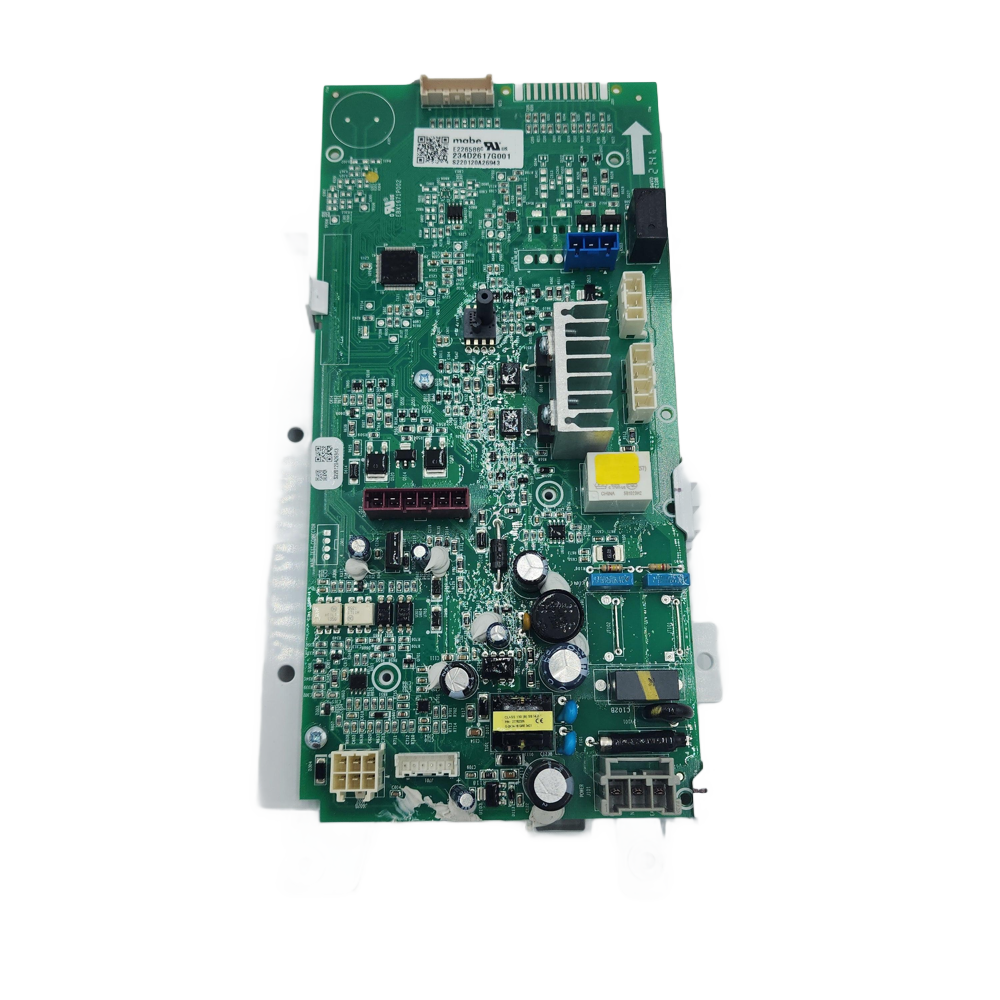
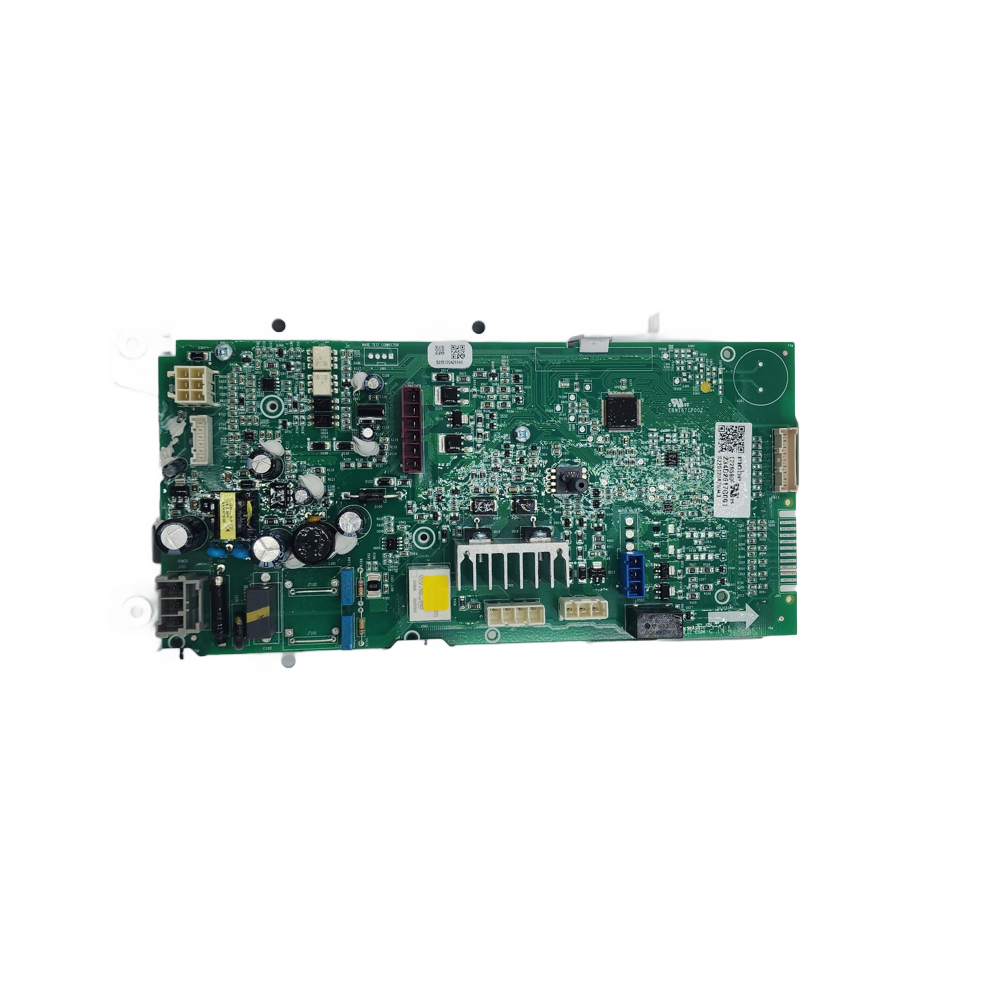
WW01F01893 Washer Control Board & Support Assembly - XPart Supply
WW01F01893 Washer Control Board & Support Assembly - XPart Supply Ltd.
WW01F01893 Washer Control Board & Support Assembly - XPart Supply
Technical diagram of a washer layout with labeled parts on a white background

WW01F01893 Washer Control Board & Support Assembly (Main PCB, Electronic Control Module, Control Board with Mount)

Sale price
$119.99
Regular price
$214.74
You save
$94.75 (44%)

XPart Number: 9775369912609   |   GTIN: 3513804172813

Condition: New

Product variant with selected options does not exist!

Frequently Bought Together

Guaranteed to fit your model: Need help? Call 833-899-7278

Shipper / Seller: XPart Supply Ltd.

Professional Repair Time: 75-120 minutes
DIY Repair Time: 120-180 minutes
Difficulty Rating: Advanced (4.5/5) — Requires advanced technical knowledge, careful handling of electronic components, precise reconnection of 8-12 electrical connectors, attention to detail, understanding of multiple circuit functions

  • Washer not starting at all (no power)
  • Washer not filling with water (inlet valves not activating)
  • Washer filling but not washing (motor not running)
  • Washer not draining (drain pump not activating)
  • Washer not spinning (motor not reaching spin speed)
  • Control panel display not working or showing error codes
  • Control panel buttons not responding
  • Door lock not engaging or disengaging
  • Washer stopping mid-cycle
  • Unusual clicking or buzzing sounds from control board area
  • Washer cycling through functions erratically
  • Water temperature not correct
  • Wash cycle timing incorrect
  • Motor speed control problems
  • Drain pump running continuously

Item #69 in diagram.

Main Control Board, Electronic Control Board, PCB Assembly, Control Module, Board and Support Assembly, Washer Brain, Machine Control Unit

WH16X27251, 234D2621G001, E226586C, E226586, 234D2617G001, S201016A03901

GE, General Electric, Hotpoint, RCA, Westinghouse, Monogram, Café, Profile

Fits Models: (Ctrl+F and Enter Your Model Number)


GUD24GSSM0WW, GUD27GSSM0WW, GUD24ESMM0WW, GUD27ESMM0WW, GUD37ESMM0DG, GUD24ESSM0WW, GUD27ESPM0DG, GUD27ESSM0WW, GUD27ESMM1WW, GUD27ESSM1WW, GUD27ESPM1DG, GUD37ESMM1DG, GUV27ESSM1WW, GUD27GSPM1DG, GUD27GSSM2WW, XUD27ESSM1WW, XUD27GSSM1WW, CLME71214BAT00, GUD27GSPM0DG

CRITICAL WARNING: This is an advanced repair requiring careful handling of electronic components and precise reconnection of multiple electrical connectors (typically 8-12 wire harnesses). If you are not comfortable working with electronic components or do not have the required tools, hire a professional appliance repair technician. Improper installation can cause electrical damage, component failure, or washer malfunction.

  1. Turn off power to the washer at the circuit breaker to ensure complete power disconnection.
  2. Close the water supply valves (hot and cold) to prevent water leakage during the repair.
  3. Unplug the washer from the wall outlet for additional safety.
  4. Verify power is off by attempting to turn on the washer. The washer should not respond and the display should be blank.
  5. Open the washer door fully to provide access to the internal components.
  6. Take multiple photos of the control board location, mounting, all electrical connector positions, and wire routing before disassembly. Document from multiple angles. This is absolutely critical for proper reassembly. Use a camera or smartphone to capture high-quality images.
  7. Create a detailed connector map by photographing each of the 8-12 wire harnesses and labeling them with their function (motor, water inlet valves, drain pump, door lock, temperature sensors, pressure switch, user interface, power supply, etc.). Use masking tape to label each connector as you photograph it. Number each connector (1-12) for easy reference.
  8. Remove the top panel of the washer by locating and removing the screws securing it (typically 2-4 screws on the back of the top panel).
  9. Slide the top panel back approximately 1-2 inches and lift it up to remove it. Set it aside in a safe location.
  10. Locate the control board and support assembly mounted on the top front of the washer (typically behind the control panel area).
  11. Take additional detailed photos of all electrical connectors before disconnecting. Photograph each connector from multiple angles to capture the connector type, orientation, wire colors, and pin positions.
  12. Disconnect all electrical connectors from the old control board by pressing the locking tabs and pulling the connectors straight off. Do not pull on the wires—grasp the connector bodies. Label each connector with masking tape indicating its number (1-12), function, and original position.
  13. Verify all connectors are disconnected by attempting to gently move the control board. The board should not be attached to any connectors.
  14. Locate the control board mounting screws that secure the board and support assembly to the washer frame (typically 4-6 mounting screws).
  15. Remove the mounting screws using a Phillips screwdriver or nut driver.
  16. Carefully remove the old control board and support assembly from the washer and place it on a clean work surface with adequate space for inspection.
  17. Inspect the old control board for visible damage such as burned components, cracked solder joints, corrosion, discoloration, bulging capacitors, burned triacs or relays, or burned areas. This confirms the diagnosis.
  18. Inspect the control board mounting location on the washer frame for damage, corrosion, or debris. Clean the mounting area if necessary using a dry cloth.
  19. Unpack the new WW01F01893 control board and support assembly from its packaging. Handle carefully to avoid damaging the board or components. Avoid touching the circuit board surface or electronic components.
  20. Verify the control board specifications match the old board: board dimensions approximately 10-14 inches x 6-8 inches, connector types and positions (8-12 wire harnesses), mounting hole locations, relay and triac positions, support bracket design.
  21. Compare the new control board to the old one to verify the dimensions, connector positions, mounting holes, and overall appearance match. Ensure you have the correct replacement part.
  22. Inspect the new control board for any damage or defects before installation. The board should be intact with no visible damage, burned components, or cracked solder joints.
  23. Position the new control board and support assembly on the washer frame, aligning the mounting holes with the frame mounting points.
  24. Install the mounting screws to secure the board and support assembly to the washer frame. Tighten gently but firmly—do not overtighten, which can crack the board or mounting bracket.
  25. Verify the control board is securely mounted and does not wobble or shift when gently pressed.
  26. Reconnect all electrical connectors to the new control board by pushing each connector straight onto the board terminals until it clicks into place. Use your numbered and labeled connectors and detailed photos to ensure correct connector placement.
  27. Verify each connector is fully seated by gently tugging on the connector. The connector should not pull off—it should be firmly seated.
  28. Double-check all connector connections by comparing your installation to your detailed photos. Verify each of the 8-12 connectors is in the correct position and fully seated.
  29. Verify no connectors are loose or partially seated by visually inspecting all connections. All connectors should be flush against the control board.
  30. Reinstall the top panel by positioning it on the washer, sliding it forward into place, and securing it with the mounting screws.
  31. Restore power at the circuit breaker and plug in the washer.
  32. Open the water supply valves (hot and cold).
  33. Turn on the washer and observe the control panel display. The display should illuminate and show the default settings or welcome screen.
  34. Test the control panel buttons by pressing various buttons. The buttons should respond and the display should change accordingly.
  35. Run a short test cycle (approximately 5-10 minutes) to verify the washer fills, washes, drains, and spins properly.
  36. Verify the door lock engages when the cycle starts. The door should lock and remain locked during the cycle.
  37. Monitor the washer throughout the full cycle to verify proper operation of all functions including filling, washing, draining, and spinning.
  38. Test multiple wash cycles with different settings to verify the control board operates properly under various conditions.
  39. Listen for unusual noises from the control board area. The control board should operate quietly without clicking, buzzing, or humming sounds (except for normal relay clicking during cycle transitions).
  40. Monitor the washer for 24-48 hours to ensure the control board operates properly without issues.

Safety Notes: Always turn off power at the circuit breaker and unplug the washer before working on it to prevent electrical shock. Handle electronic components carefully to avoid damaging sensitive circuits. Do not touch the circuit board surface or electronic components with bare hands—use an anti-static wrist strap if available. Ensure all 8-12 electrical connectors are fully seated and secure before restoring power. This repair requires advanced technical knowledge and careful attention to detail—most homeowners should hire a professional appliance repair technician for this repair.

  1. Document all 8-12 wire harnesses with detailed photos and create a comprehensive connector map before disconnecting. Take high-quality photos of each electrical connector from multiple angles, capturing the connector type, orientation, wire colors, and pin positions. Create a detailed connector map or reference guide with labels for each connector function (motor, water inlet valves, drain pump, door lock, temperature sensors, pressure switch, user interface, power supply, etc.). Number each connector (1-12) with masking tape as you photograph it. This documentation is critical for ensuring correct reconnection and avoiding costly mistakes.
  2. Use a systematic numbering and labeling approach for all connectors. As you photograph each connector, immediately label it with masking tape indicating its number (1-12), function, and original position on the control board. Keep the labeled connectors organized in numerical order as you disconnect them. This prevents confusion during reassembly and ensures correct connector placement.
  3. Verify connector orientation and pin alignment before reconnection. Some connectors can be inserted in the wrong orientation, which will prevent proper board operation or cause component damage. Compare each connector orientation to your reference photos before reconnecting. The connector should insert smoothly without forcing. If a connector does not insert smoothly, stop and verify the orientation is correct. Never force a connector onto the board.
  4. Test the old control board with a multimeter before ordering a replacement. Use a multimeter set to voltage mode to test for power at the control board power input connector. A functioning board should show 120V AC at the power input connector. Zero voltage indicates a power supply failure or burned-out board. Test the motor output with the washer set to wash cycle—you should see voltage at the motor connector. Test the water inlet valve outputs—you should see voltage when the washer is filling. Testing prevents unnecessary board replacement and identifies upstream power supply issues.
  5. Inspect all capacitors for signs of failure before concluding the board is faulty. Electrolytic capacitors commonly fail in control boards, causing loss of functions or erratic operation. Look for bulging, leaking, or burned capacitors on the board. Bulging or leaking capacitors indicate board failure and require replacement. A single failed capacitor can disable entire circuit sections. Capacitors typically fail after 5-10 years of operation.
  6. Inspect all relays and triacs for signs of burning or corrosion. Relays control motor and pump activation, and triacs control motor speed. Look for burned or discolored relays and triacs on the board. Burned components indicate board failure and require replacement. Relay or triac failure will prevent proper component activation even with a functioning microprocessor.
  7. The control board manages both 120V AC and 240V AC circuits simultaneously. The control board receives 120V AC for logic and display functions and may receive 240V AC for motor control on some models. Verify both voltages are present at the power input connectors before concluding the board is faulty. Loss of either voltage will prevent proper operation.
  8. Allow the washer to complete a full cycle before evaluating performance. After installing the new control board, run a complete wash cycle (approximately 30-45 minutes) to verify all functions operate properly throughout the entire cycle. Do not interrupt the cycle. Monitor the washer throughout the cycle to verify filling, washing, draining, and spinning all function correctly.
  9. The control board communicates with multiple sensors throughout the washer. The pressure switch monitors water level, temperature sensors monitor water temperature, and other sensors monitor cycle progress. If the washer does not operate properly after board replacement, verify all sensors are connected and functioning correctly by testing with a multimeter.
  10. This repair is cost-effective compared to washer replacement. The cost of control board replacement ($120-180) is far less than the cost of a new washer ($1,200-3,000+). Replace the control board promptly when failure is detected to prevent the need for expensive washer replacement and to restore proper washer operation and all electronic functions.


Whirlpool refrigerator replacement parts, Frigidaire refrigerator replacement parts, GE refrigerator replacement parts, Kenmore refrigerator replacement parts, KitchenAid refrigerator replacement parts, LG refrigerator replacement parts, Maytag refrigerator replacement parts, Whirlpool refrigerator drawers and glides replacement, Whirlpool dishwasher replacement parts, GE dishwasher replacement parts, KitchenAid dishwasher replacement parts, Maytag dishwasher replacement parts, Frigidaire dishwasher replacement parts, Kenmore dishwasher replacement parts, Whirlpool washer replacement parts, GE washer replacement parts, Maytag washer replacement parts, Kenmore washer replacement parts, LG washer replacement parts, Whirlpool dryer replacement parts, GE dryer replacement parts, Maytag dryer replacement parts, Kenmore dryer replacement parts, LG dryer replacement parts, Whirlpool range replacement parts, GE range replacement parts, Whirlpool stove replacement parts, GE stove replacement parts, GE oven replacement parts, GE microwave replacement parts, buy Whirlpool refrigerator parts online, buy GE dishwasher parts online, replacement Kenmore washer parts for sale, buy Maytag dryer parts, LG washer replacement parts online, KitchenAid refrigerator parts for sale, Whirlpool stove and range replacement parts

WW01F01893 Washer Control Board & Support Assembly

The WW01F01893 is a genuine OEM washer control board & support assembly for GE and compatible top-load washers. This assembly includes the main electronic control board (PCB) pre-mounted to its support bracket, responsible for managing all washer functions—cycle selection, water fill, agitation, spin, and diagnostics. Features include solid-state relays, microprocessor control, factory-programmed firmware, and vibration-resistant mounting. Typical lifespan is 6–12 years; failures are most often due to power surges, water intrusion, or component aging. Symptoms: washer won’t start, unresponsive controls, error codes, or erratic operation. IMPORTANT: Only use OEM assemblies for proper fit and software compatibility. CRITICAL: Disconnect power before servicing. Static discharge can damage board—use ESD precautions.
Technical diagram of a washer layout with labeled parts on a white background

Cross Reference Information

Item #69 in diagram.

Main Control Board, Electronic Control Board, PCB Assembly, Control Module, Board and Support Assembly, Washer Brain, Machine Control Unit

GE, General Electric, Hotpoint, RCA, Westinghouse, Monogram, Café, Profile

WH16X27251, 234D2621G001, E226586C, E226586, 234D2617G001, S201016A03901

Guaranteed to Fit Your Model


GUD24GSSM0WW, GUD27GSSM0WW, GUD24ESMM0WW, GUD27ESMM0WW, GUD37ESMM0DG, GUD24ESSM0WW, GUD27ESPM0DG, GUD27ESSM0WW, GUD27ESMM1WW, GUD27ESSM1WW, GUD27ESPM1DG, GUD37ESMM1DG, GUV27ESSM1WW, GUD27GSPM1DG, GUD27GSSM2WW, XUD27ESSM1WW, XUD27GSSM1WW, CLME71214BAT00, GUD27GSPM0DG

Frequently Asked Questions


Not sure about your model number? Call 833-899-7278 and we’ll help you confirm. All brand names are the property of their respective owners and are used for compatibility reference only.

BUILT TOUGH · PARTS THAT LAST · GUARANTEED

Trusted Family Business

30 years of Excellence in Appliance Parts

Whether you need a refrigerator water filter, a replacement burner for your stove, or a dryer belt, XPart Supply has you covered. We carry a wide selection of appliance parts in Kitchener-Waterloo for all major brands, including washers, dryers, refrigerators, dishwashers, ovens, and more.

We also offer used appliances and scratch-and-dent appliances in Kitchener-Waterloo, providing affordable, reliable options for customers looking to save money without sacrificing performance. Every appliance is inspected and tested for quality.

For over 30 years, our family-owned business has proudly served the community with quality appliance parts and exceptional service. What started as a small local shop has grown into a trusted name — but we’ve never forgotten our roots. Every customer receives the personal attention and care that only a family-owned business can provide.

When you need appliance parts, used appliances, or scratch-and-dent appliances in Kitchener-Waterloo, trust XPart Supply — Built Tough. Parts That Last.

Years of Experience

Our knowledge has been built over the past 30 years in the business, ensuring expert advice for every appliance need.

Personal Service Guarantee

We treat every customer like family, providing personalized solutions and standing behind our products.

Built on Trust

Our reputation has been built one satisfied customer at a time, creating lasting relationships in our community.

Buy Online Pick Up In-Store

Address
101 Trillium Dr
Kitchener, Ontario N2E 1W8
Phone
Hours
Mon–Fri 9 AM–5 PM • Sat 9 AM–1 PM

Get Directions